
Controlled trim, margins, recto and verso pages, running heads, page numbers, embedded fonts, image checks, and print preflight.
Markdown to book
Convert Markdown to a print-ready PDF and EPUB.
BookSetter turns structured manuscripts into deliberate editions. Confirm the detected Book Map, choose a design direction, inspect rendered pages, and export print and ebook files with validation evidence.
DOCX, Markdown, and major text formats accepted. No credit card for previews. No subscription.
70,435source words
0unresolved missing words
0EPUBCheck messages
6x9 PDF/Xprint proof
Manuscript inputs
Start with the strongest text source you have.
BookSetter preserves the uploaded original, normalizes supported sources into one semantic working representation, and requires structured conversions to pass a visible-text integrity check before layout.
| Input | Best preparation | BookSetter treatment |
|---|---|---|
| DOCX | Use Title, Heading 1 chapters, Heading 2 subheads, real lists, notes, tables, captions, and document properties. | Direct semantic parsing plus a readiness report and reviewable Book Map. |
| Markdown | Use YAML metadata, one # per book-level element, and semantic markup for notes, figures, quotations, and tables. | Native import with source preparation, accessibility checks, and structural diagnostics. |
| TXT | Put labels such as Chapter One, Part II, Introduction, and Appendix A on lines by themselves. | Plain-text chapter detection; unmarked files can enter as one chapter for Book Map repair. |
| RTF and ODT | Use named heading styles and real lists. Remove obsolete objects and keep original image files. | Sandboxed normalization, embedded-raster preservation, and visible-text comparison. |
| HTML | Use semantic headings, paragraphs, lists, quotations, figures, and captions. Remove page chrome and scripts. | Active-content rejection followed by sandboxed semantic normalization. |
| RST, AsciiDoc, Org, and LaTeX | Use native section syntax consistently and resolve custom includes or macros when possible. | Sandboxed normalization; conversion stops if extracted visible text changes. |
Legacy DOC, macro-enabled Word files, proprietary Pages packages, PDFs, and unknown binary files must first be exported as DOCX, ODT, Markdown, or plain text. PDF is the composed output here, not an editable manuscript input.
Format-specific output
One manuscript, three publishing plans.
Print typography and reflowable ebook behavior solve different problems. BookSetter resolves each output independently from the same semantic manuscript.
Semantic XHTML, navigation, accessibility metadata, responsive images, conservative CSS, and reader-controlled body typography.
A low-complexity retailer profile designed for Kindle Previewer review and compatibility with Amazon's reflowable typography pipeline.
Production workflow
Structure is confirmed before pages are composed.
- ImportUpload DOCX, Markdown, plain text, RTF, ODT, HTML, reStructuredText, AsciiDoc, Org, or LaTeX and preserve the source manuscript. Word users can follow the DOCX preparation guide.
- Confirm Book MapReview title matter, copyright, contents, parts, chapters, appendices, and back matter, then confirm the Roman-to-Arabic boundary.
- Choose an edition directionUse professional defaults or control trim, density, typography, accessibility, images, and tables.
- Review rendered proofInspect important pages, spread balance, scene breaks, captions, tables, and validation findings.
- ExportDownload final artifacts with reproducible settings and QA reports.
Beyond file conversion
A book needs more than “Save as PDF.”
Direct conversion can preserve words while losing book structure, page logic, accessibility, and retailer readiness.
| Production need | Simple conversion | BookSetter |
|---|---|---|
| Front versus main matter | Often inferred from heading order | Author-confirmed Book Map controls numbering and landmarks |
| Print pagination | Generic page breaks | Recto starts, intentional blanks, widows, orphans, headers, and page-number plans |
| Ebook behavior | Print styling reused in reflow | Semantic, reader-controlled EPUB profile with separate Kindle adaptation |
| Tables and figures | Scaled or detached mechanically | Measured placement, caption anchoring, alt-text checks, and width diagnostics |
| Release evidence | A file exists | EPUB validation, PDF preflight, accessibility, font, and text-integrity reports |
Proof before promises
Inspect the source, pages, and reports.
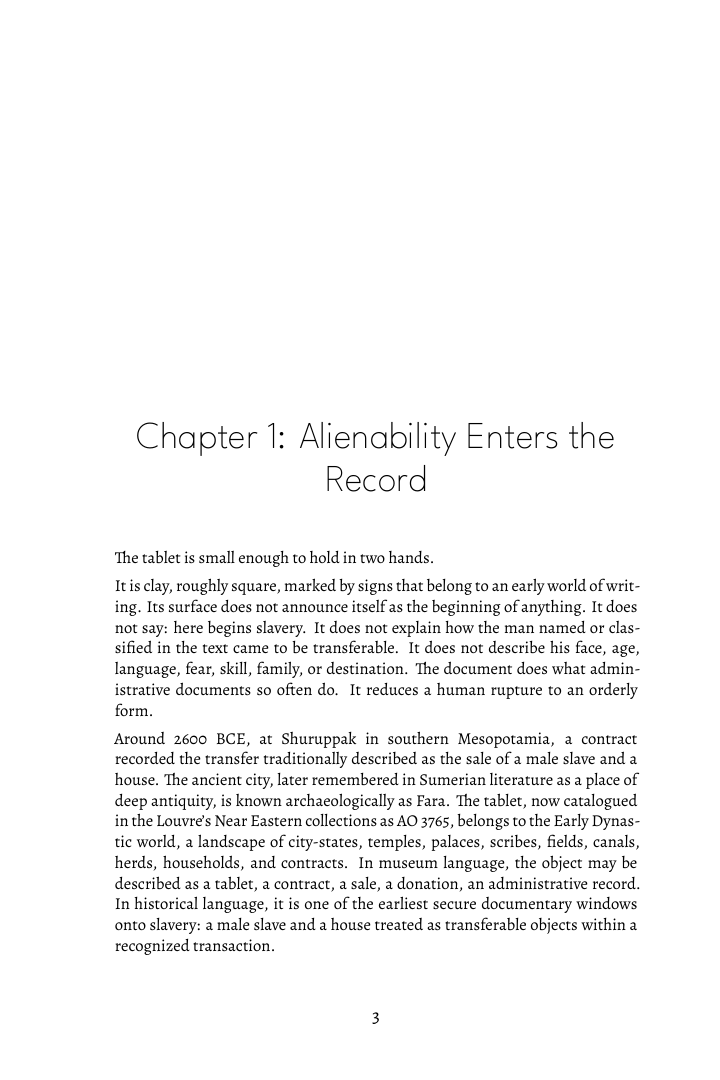
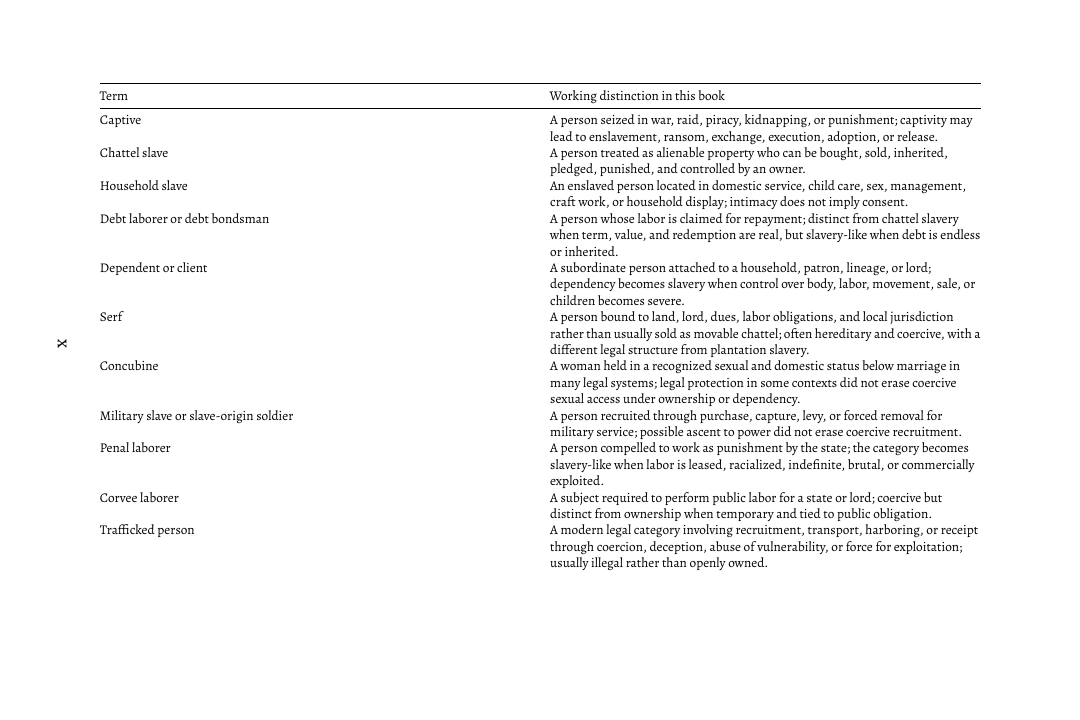
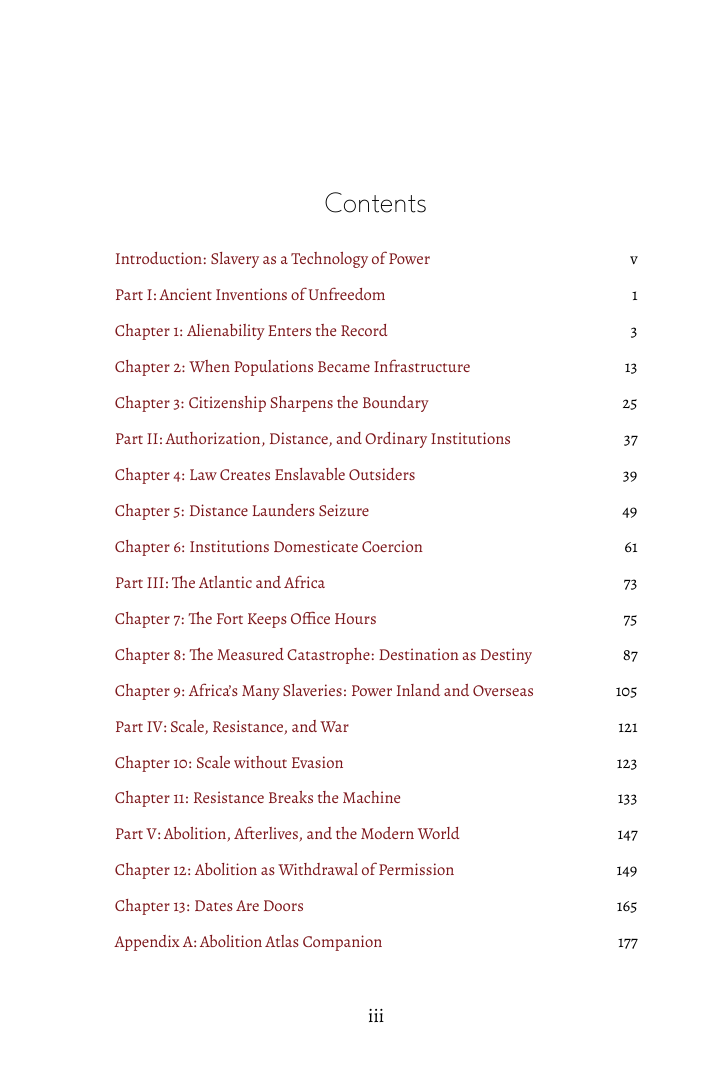
The History of Slavery case study exposes a Markdown excerpt, rendered front matter, chapter and table pages, a selected-page PDF, EPUBCheck output, PDF preflight, word-integrity results, and font-license evidence.
Questions
Markdown, PDF, and EPUB answers
Can BookSetter convert other text formats as well as DOCX and Markdown?
Yes. BookSetter accepts DOCX; Markdown; TXT; RTF; ODT; HTML; reStructuredText; AsciiDoc; Org; and LaTeX. Structured-text conversions must preserve the extracted visible text before they reach Book Map review.
What files does BookSetter export?
An eligible Free First Edition Beta or paid book package can produce a generic EPUB, a Kindle-targeted EPUB, a print-ready paperback PDF, DOCX content, and validation reports.
Does BookSetter rewrite the manuscript with AI?
No. The production pipeline preserves manuscript text unless the author explicitly chooses a separate editorial action. External AI is used only as an optional, metered critic or recommender around deterministic rendering.
Is the PDF guaranteed to be accepted by every printer?
No formatter can guarantee every vendor submission. BookSetter checks trim, fonts, images, syntax, and common print-preflight risks, but authors must confirm the current specifications for their selected printer and edition.
Does the EPUB force a particular reading font?
No. Reflowable EPUB output defaults to reader-controlled body typography and conservative CSS, while print PDF typography is deliberately composed and embedded.
Start with the manuscript
Preview the structure and pages before paying.
Eligible verified creators may receive one publishable package through the limited Free First Edition Beta without a card. Additional launch books are $29, regularly $49.
Product facts and prices last reviewed .